Checking for Syslog Viewer Updates
By default, whenever you start Syslog Viewer, it checks for a new software update. If there is an update, you are prompted to download and install it, as shown in the following example:
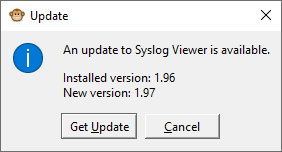
Simply click Get Update to download and install.
To enjoy the latest Syslog Viewer features, it's recommended to keep this feature enabled.
| ➢ | To enable or disable checking for updates: |
| 1. | On the toolbar, click the Options  icon; the Options dialog box appears. icon; the Options dialog box appears. |
| 2. | Under the Miscellaneous group, select or clear the 'Check new version' check box to enable or disable this feature, respectively. |
| 3. | Click OK. |